Showing posts with label mmc. Show all posts
Showing posts with label mmc. Show all posts
Wednesday, January 7, 2015


Friday, November 14, 2014
Nokia 5233 memory card corrupted MMC problem solution
Memory Card Problem in Nokia 5233 can be solve with a few steps that are given in this post.you can see diagram bellow and do same steps as give.in case of MMC Nokia 5233 will not be able to show Memory Card and will not be able play data in memory card.

to solve memory card problem view all parts and tracks as given in diagram above.memory card tracks shown in different colors and you can see path easily.resold mmc ic and if not work replace it with new one.
for more detail and new tips and tricks about cellphone service problem keep visiting this page we will update daily this blog timely with other mobile solution.
to solve memory card problem view all parts and tracks as given in diagram above.memory card tracks shown in different colors and you can see path easily.resold mmc ic and if not work replace it with new one.
for more detail and new tips and tricks about cellphone service problem keep visiting this page we will update daily this blog timely with other mobile solution.
Wednesday, November 12, 2014

Saturday, November 8, 2014
Nokia 5250 MMC Memory Card Problem Solution Ways Jumpers
if Memory Card MMC is not working proper in Nokia 5250 or having fault inset Memory Card or Memory Card is not inserted etc

that will help you to solve this issue all parts that are shown in diagram with blue lines and box are used in mmc function so resold these parts and if problem not solve then replace these parts it will help you to solve memory card problem in Nokia 5250.
for more detail and new tips and tricks about this problem keep visiting this page we will update it timely with new diagrams.some related post are also given bellow you can read them also for more information.
Read More..
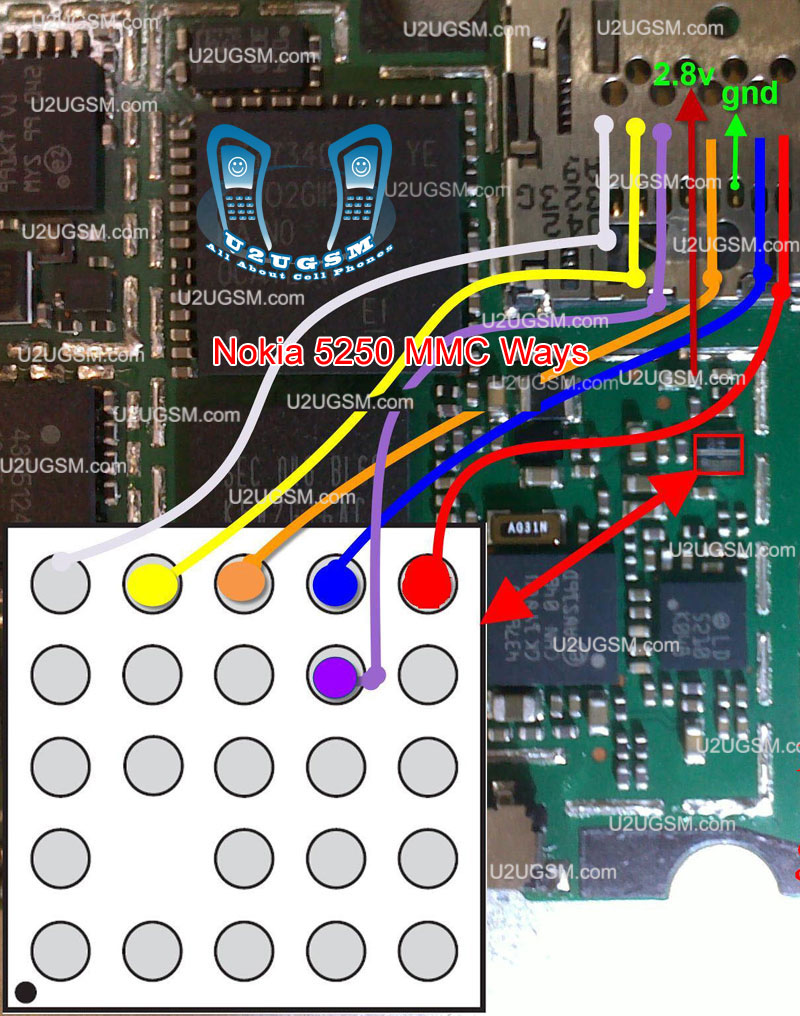
that will help you to solve this issue all parts that are shown in diagram with blue lines and box are used in mmc function so resold these parts and if problem not solve then replace these parts it will help you to solve memory card problem in Nokia 5250.
for more detail and new tips and tricks about this problem keep visiting this page we will update it timely with new diagrams.some related post are also given bellow you can read them also for more information.
Thursday, October 23, 2014
Blackberry 9105 cellular phone mmc not work repair solution
blackberry 9105 cellular phone mmc not work repair solution,blackberry 9105 mmc not format solution ,blackberry 9105 mmc jumper ways solution , blackberry 9105 in memory but not accept solution ,blackberry 9105 memory not working solution ,blackberry 9105 memory not working repair guide ,blackberry 9105 memory not accept repair guide blackberry mmc not working repair solution here 100% tested this solution see this i hope solved your problem many time phone water damage phone run but put memory set memory not working if u have this problem blackberry 9105 cellular phone i have this problem 100% tested solution see my solution i hope solved your phone blackberry memory not working done.blackberry 8520 sim ways solution 100% tested solution many time.

yes try this way i think solve your phone blackberry 9105 memory not working 100% working solution.
Monday, September 8, 2014

Monday, September 1, 2014
Nokia C1 01 microSD Memory Card MMC not detected solution
This solution below can be used to fix Nokia C1-01 microSD memory card not detected problem issues, this problem may possibly occurred if the device suffered wet or water damaged. If this happens the Nokia C1-01 will not been able to detect any microSD memory card that inserted to it and it shows on the display the "NO memory card is inserted or memory card not detected".
The solution below below shows the location of certain component that needs to be check or replace to solve nokia C1-01 memory card not detected issues.
The solution below below shows the location of certain component that needs to be check or replace to solve nokia C1-01 memory card not detected issues.
Nokia C1-01 microSD Memory Card Not detected
The Nokia C1-01 MMC IC is located and mounted just besides the microSD slot. By replacing the MMC IC will possibly fix a damaged Nokia C1-01 that does not accept or read any microSD memory card.
Thursday, August 28, 2014

Sunday, August 24, 2014
Nokia X2 00 mmc not working
Nokia X2 with Memory Card Jumpers, Memory card Problems, Memory Card Ways, MMC Problem, MMC Solution
nokia x2-00 mmc not working
nokia x2-00 mmc solution
nokia x2-00 mmc ic jumper solution
nokia x2-00 light ic
nokia x2 02 mmc ic jumper
x2 memory ic jumper
nokia x2-00 memory card not working
x2 mmc ic jumper
nokia x2 memory card solutoin
x2-00 memory card problem
x2 mmc ic

if there is any water damages or rust clean these parts with electronics cleaner and leave it to dry for a few mints under electrical bulb
nokia x2-00 mmc not working
nokia x2-00 mmc solution
nokia x2-00 mmc ic jumper solution
nokia x2-00 light ic
nokia x2 02 mmc ic jumper
x2 memory ic jumper
nokia x2-00 memory card not working
x2 mmc ic jumper
nokia x2 memory card solutoin
x2-00 memory card problem
x2 mmc ic
if there is any water damages or rust clean these parts with electronics cleaner and leave it to dry for a few mints under electrical bulb
Thursday, August 21, 2014
Nokia 205 mmc ways problem jumper solution
Now showing about repairing nokia asha 205 mmc not found ,mmc not working and mmc not detected problems.This solution helpful for nokia asha 205 mmc ways this is very simple work. If your phone has this problem then first check your phone with a good memory card if problem still then repair your phone following below solution.

Tuesday, August 19, 2014
N95 8gb mmc convert to mmc w slot tested solution 1005
ello guy i want to share this
my own solution for n95 8gb
memory not available
and i search this forum and i took
some of tricks is succeed
step 1.
step 2.
and my solution w/out soldering the memory micro
step 3.take out or remove the big ic find mmc card reader from the 3110c to make it the slot
then apply this jumper
my own solution for n95 8gb
memory not available
and i search this forum and i took
some of tricks is succeed
step 1.

step 2.

and my solution w/out soldering the memory micro
step 3.take out or remove the big ic find mmc card reader from the 3110c to make it the slot

then apply this jumper
Subscribe to:
Posts (Atom)
