Showing posts with label problem. Show all posts
Showing posts with label problem. Show all posts
Sunday, November 23, 2014


Sunday, November 16, 2014
Repair Samsung C3303 Champ Auto Charging Problem Solution

Repair Samsung C3303 Champ Auto Charging Problem Solution
Repair Samsung C3303 Champ Auto Charging Problem
Repair Samsung C3303 Champ Not Charging Problem
Repair Samsung C3303 Champ Auto Charging Problem By Jumpers
Friday, November 14, 2014
Nokia 5233 memory card corrupted MMC problem solution
Memory Card Problem in Nokia 5233 can be solve with a few steps that are given in this post.you can see diagram bellow and do same steps as give.in case of MMC Nokia 5233 will not be able to show Memory Card and will not be able play data in memory card.

to solve memory card problem view all parts and tracks as given in diagram above.memory card tracks shown in different colors and you can see path easily.resold mmc ic and if not work replace it with new one.
for more detail and new tips and tricks about cellphone service problem keep visiting this page we will update daily this blog timely with other mobile solution.
to solve memory card problem view all parts and tracks as given in diagram above.memory card tracks shown in different colors and you can see path easily.resold mmc ic and if not work replace it with new one.
for more detail and new tips and tricks about cellphone service problem keep visiting this page we will update daily this blog timely with other mobile solution.
Wednesday, November 12, 2014

Nokia Asha 200 Keypad Not Working Ic Jumper Problem Solution
In nokia asha 200 keypad problem can be due to rust carbon or water damage in this case keypad ic can be damage or keypad track can be missed from any point. for solving keypad problem in nokia asha 200 you can see diagram bellow.Android Tool 1.4 Pattern Unlock IMEI Repair OC Root APK

In above diagram there are two main dial ic these are used for keypad functions and these are controlling keypad opetions.in upcoming days I will add a post about keypad track of nokia asha 200 that will also help you to see that which keys are linked with each other.
For this post you only can clean the board ic and keypad if there is some rust or carbon. you can resold these two parts and can replace these two ic for keypad problem in nokia asha 200.
For more detail and new tips and tricks about cellphone service problem keep visiting this page we will update daily this blog timely with other mobile solution. Some related post are also given bellow you can read them also for more information about cell phone.
In above diagram there are two main dial ic these are used for keypad functions and these are controlling keypad opetions.in upcoming days I will add a post about keypad track of nokia asha 200 that will also help you to see that which keys are linked with each other.
For this post you only can clean the board ic and keypad if there is some rust or carbon. you can resold these two parts and can replace these two ic for keypad problem in nokia asha 200.
For more detail and new tips and tricks about cellphone service problem keep visiting this page we will update daily this blog timely with other mobile solution. Some related post are also given bellow you can read them also for more information about cell phone.
Sunday, November 9, 2014
NOKIA N73 CHARGE PROBLEM

Saturday, November 8, 2014
Nokia 5250 MMC Memory Card Problem Solution Ways Jumpers
if Memory Card MMC is not working proper in Nokia 5250 or having fault inset Memory Card or Memory Card is not inserted etc

that will help you to solve this issue all parts that are shown in diagram with blue lines and box are used in mmc function so resold these parts and if problem not solve then replace these parts it will help you to solve memory card problem in Nokia 5250.
for more detail and new tips and tricks about this problem keep visiting this page we will update it timely with new diagrams.some related post are also given bellow you can read them also for more information.
Read More..
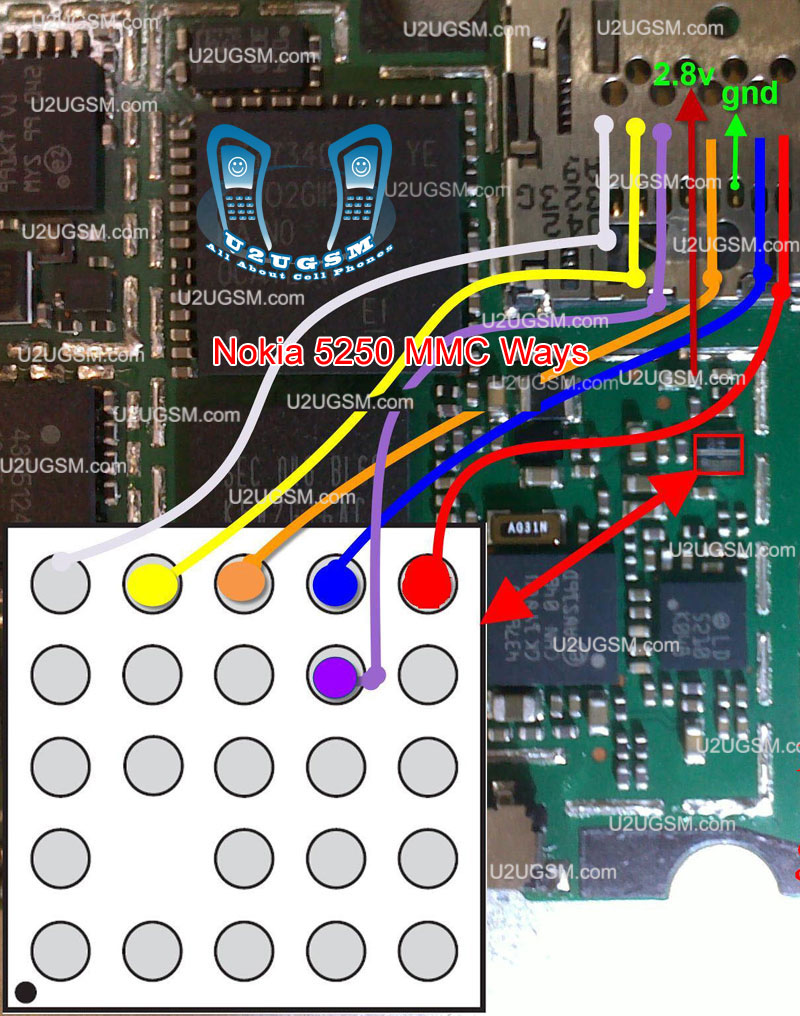
that will help you to solve this issue all parts that are shown in diagram with blue lines and box are used in mmc function so resold these parts and if problem not solve then replace these parts it will help you to solve memory card problem in Nokia 5250.
for more detail and new tips and tricks about this problem keep visiting this page we will update it timely with new diagrams.some related post are also given bellow you can read them also for more information.
Nokia asha 200 Battery Terminal Points Damage Ways Problem Solution
Nokia Asha 200 Battery Terminal Points Damage Ways Problem Solution if in Nokia Asha 200 during changing battery terminal points you have loss battery points then you can solve this problem with this diagram bellow posted in this post.

there are three different color lines in this post shows that how you can make jumpers so check these links with meter and if any of them is broken make these jumpers with insulation wire.this diagram can help you in case Nokia Asha 200 is dead you can check these links so that battery crunt can pass through right ways and can be set on off.
for more detail and new tips and tricks about this problem keep visiting this page we will update it timely with new diagrams.some related post are also given bellow you can read them also for more information.
there are three different color lines in this post shows that how you can make jumpers so check these links with meter and if any of them is broken make these jumpers with insulation wire.this diagram can help you in case Nokia Asha 200 is dead you can check these links so that battery crunt can pass through right ways and can be set on off.
for more detail and new tips and tricks about this problem keep visiting this page we will update it timely with new diagrams.some related post are also given bellow you can read them also for more information.
Monday, October 27, 2014
Nokia 2710 Mic mouthpiece microphone problem solution
Heres the solution for Nokia 2710 navigation edition when trying to fix a microphone problem issues. Its a failure on the hardware which there is no audio sound can be heard over the receivers earpiece speaker.
This solution simply shows the location of the components where you may to have a check or replace if found damaged. In Nokia 2710ne, the cell phone microphone is installed or mounted on the bottom side of the PCB board, and also all of its corresponding circuit components such as the filter coils or surface mount inductors, chip resistors and chip capacitor were also mounted near to it.
 This also includes the circuit connection line paths (mic ways) for easy tracing procedures. The three lines paths corresponds to the polarity of the audio signals, the red line is for the positive, the blue line is for negative and the bright green lines correspond as the positive voltage bias of the microphone. If this voltage bias when cut or damaged it will also result to a poor audio signal level or no microphone audio signal.
This solution simply shows the location of the components where you may to have a check or replace if found damaged. In Nokia 2710ne, the cell phone microphone is installed or mounted on the bottom side of the PCB board, and also all of its corresponding circuit components such as the filter coils or surface mount inductors, chip resistors and chip capacitor were also mounted near to it.
Nokia 2710NE Mouthpiece microphone circuit components and test spots

Saturday, October 18, 2014
Nokia 2330 Classic speaker ear piece problem solution jumper ways
If speaker is not working in Nokia 2330 Classic. We can not hear a voice call.Noice in ear peace speaker or low voice problem can be solve with this post.Read carefully all these tips and follow diagram that is given bellow to solve speaker problem solution in Nokia 2330 Classic.

In above diagram you can see red and blue lines.These lines are tracks and paths that are used in speaker function in Nokia 2330 Classic. So check all these parts with meter and if any of them is missing apply jumper.You can apply jumper at points that are shown in diagram for repairing speaker problem solution.
for more detail and new tips and tricks about cellphone service problem keep visiting this page we will update cellphone service diagrams timely with new cellphone diagrams.some related post are also given bellow you can read them also for more information about cellphone.
In above diagram you can see red and blue lines.These lines are tracks and paths that are used in speaker function in Nokia 2330 Classic. So check all these parts with meter and if any of them is missing apply jumper.You can apply jumper at points that are shown in diagram for repairing speaker problem solution.
for more detail and new tips and tricks about cellphone service problem keep visiting this page we will update cellphone service diagrams timely with new cellphone diagrams.some related post are also given bellow you can read them also for more information about cellphone.
Friday, October 17, 2014
Nokia E55 E52 Mic ways Not Working

Nokia E55/E52 Mic Problem
Nokia E55/E52 Mic Line Trac
Nokia E55/E52 Mic Not Working
Nokia X2 02 Lcd Display Jumper Ways Problem Solution
Nokia X2-02 No display solution, Nokia X2-02 LCD problem solution, Nokia X2-02 Lcd jumper ways, Nokia X2-02 white and blank display lcd. All these problems can be due to water damages. Carbon and burn parts of the smartphone.nokia Asha 203 Usb Not Charging Problem Solution Jumper Ways

After disassambly of Nokia X2-02 look at the motherboard for rust carbon or burren parts. If you found some rust or carbon apply electronics cleaner on the mother board and apply hot air to make it dry proper.
Applying too much heat can damage the mother board and parts.It also can be harm for your skin.So keep in mind about normal heat flow when making it dry.
Remove old LCD and Check it with new one. In above diagram you can see some different color lines that are pointing to the parts which are used in Display function of Nokia X2-02.
Check all these parts with help of meter and apply jumpers as shown in above diagram to solve display problem in Nokia X2-02.
If you find some broken and missing components then apply jumper on points where small circles given in nokia lcd problem solution.
After disassambly of Nokia X2-02 look at the motherboard for rust carbon or burren parts. If you found some rust or carbon apply electronics cleaner on the mother board and apply hot air to make it dry proper.
Applying too much heat can damage the mother board and parts.It also can be harm for your skin.So keep in mind about normal heat flow when making it dry.
Remove old LCD and Check it with new one. In above diagram you can see some different color lines that are pointing to the parts which are used in Display function of Nokia X2-02.
Check all these parts with help of meter and apply jumpers as shown in above diagram to solve display problem in Nokia X2-02.
If you find some broken and missing components then apply jumper on points where small circles given in nokia lcd problem solution.
Nokia X2 02 Mic problem solution Microphone not working
If mic is not working in Nokia X2-02. Microphone solution with jumpers, Low voice of Nokia X2-02 mic problem solution, Nokia X2-02 mic jumpers to make it solve.Nokia X2-05 Not Charging Problem Solution Jumper Ways

If mic is not working or have a low voice it can be fault of mic and housing. Check Nokia X2-02 housing ( body ). All housing have a small whole at the point of mic. In some cases rust or dust cover this point and the voice can not reach proper to the mic point so make it clean if there is some dust on it.
After disassambly of Nokia X2-02 look at the motherboard for rust carbon or burren parts. If you found some rust or carbon apply electronics cleaner on the mother board and apply hot air to make it dry proper.
Applying too much heat can damage the mother board and parts.It also can be harm for your skin.So keep in mind about normal heat flow when making it dry.
Remove mic and check all these tracks that are provided in above diagram to solve mic problem in Nokia X2-02. In diagram two different color lines are given to identify all parts that are used to solve Nokia X2-02 mic problem with jumpers.
If some parts are missing or damage apply jumper on these points where small circles are pointing in nokia mic repairing diagram above.
If mic is not working or have a low voice it can be fault of mic and housing. Check Nokia X2-02 housing ( body ). All housing have a small whole at the point of mic. In some cases rust or dust cover this point and the voice can not reach proper to the mic point so make it clean if there is some dust on it.
After disassambly of Nokia X2-02 look at the motherboard for rust carbon or burren parts. If you found some rust or carbon apply electronics cleaner on the mother board and apply hot air to make it dry proper.
Applying too much heat can damage the mother board and parts.It also can be harm for your skin.So keep in mind about normal heat flow when making it dry.
Remove mic and check all these tracks that are provided in above diagram to solve mic problem in Nokia X2-02. In diagram two different color lines are given to identify all parts that are used to solve Nokia X2-02 mic problem with jumpers.
If some parts are missing or damage apply jumper on these points where small circles are pointing in nokia mic repairing diagram above.
Thursday, October 16, 2014
Nokia X2 05 Not Charging Problem Solution Jumper Ways
If we plug in charger into charging pin of Nokia X2-05 and show no notification on its Lcd. It will be cause of missing components or damages of charging pin, parts.Nokia Asha 203 MMC Memory card problem solution

If notification on the Lcd of Nokia X2-05 will be about charger not supported it can be problem of charger not supported. And if notification displays about not charging. It can be the problem of water damages of may be due to in proper values of parts that are used in charging function of Nokia X2-05.
After disassambly of Nokia X2-05 look at the motherboard for rust carbon or burren parts. If you found some rust or carbon apply electronics cleaner on the mother board and apply hot air to make it dry proper.
Applying too much heat can damage the mother board and parts.It also can be harm for your skin.So keep in mind about normal heat flow when making it dry.
In above diagram a red line bar is used to identify parts and ways that are used in solution of not charging in Nokia X2-05. Once you track these parts with meter apply jumpers if any of them is missing, damage or giving un proper values. Whlie the blue line is used for negative point of the charging base.
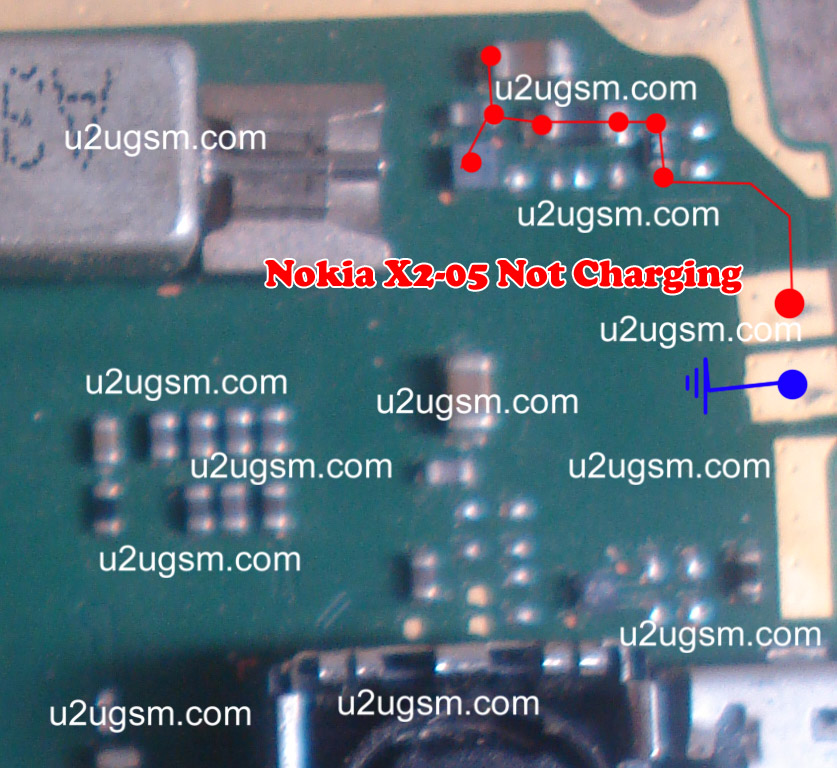
If notification on the Lcd of Nokia X2-05 will be about charger not supported it can be problem of charger not supported. And if notification displays about not charging. It can be the problem of water damages of may be due to in proper values of parts that are used in charging function of Nokia X2-05.
After disassambly of Nokia X2-05 look at the motherboard for rust carbon or burren parts. If you found some rust or carbon apply electronics cleaner on the mother board and apply hot air to make it dry proper.
Applying too much heat can damage the mother board and parts.It also can be harm for your skin.So keep in mind about normal heat flow when making it dry.
In above diagram a red line bar is used to identify parts and ways that are used in solution of not charging in Nokia X2-05. Once you track these parts with meter apply jumpers if any of them is missing, damage or giving un proper values. Whlie the blue line is used for negative point of the charging base.
6100 Insert Sim Problem

6100 Sim Problem,
6100 Sim jacket Ways,
6100 Sim Ways,
6100 Insert Sim Solution,
6100 Sim Jacket Tracks
Tuesday, October 14, 2014
NOKIA 5233 Not Charging solution no response problem solution
if we plug in charger into Nokia 5233 charging jack and it shows not charging instead of saving charging.it can be fault of charging jack or may be due to some parts.some time it can be cause of charger.so in first step replace charger and if problem will not solve then dis assemble mobile phone.
Nokia 5233 volume up down not working solution
Nokia 5233 volume up down not working solution

check whole board for rust carbon or water damage clean mother board and apply hot air so that it can be dry complete.positive link is shown with red line and green is to define ground.ground can be jumper with any ground point while in positive path you can check all parts and links if any link is not working apply jumper and if it is needed then replace parts those are missing or damage.
for more detail and new tips and tricks about cellphone service problem keep visiting this page we will update cellphone service diagrams timely with new cellphone diagrams.some related post are also given bellow you can read them also for more information about cellphone.
for more detail and new tips and tricks about cellphone service problem keep visiting this page we will update cellphone service diagrams timely with new cellphone diagrams.some related post are also given bellow you can read them also for more information about cellphone.
Wednesday, September 24, 2014
Nokia 5530 Insert Sim Problem fix problem
Nokia Mobile 5530 Xpress music Insert sim solution.


Monday, September 22, 2014

Saturday, September 20, 2014

Thursday, September 18, 2014
Nokia 111 insert sim problem solution tested working
If Nokia 111 have insert sim problem, invalid sim problem, sim not working in Nokia 111. All these sim problems of Nokia 111 can be solve with these few steps that are given in this post.

Keep in mind after dis assembly of Nokia 111 look at the whole mother board for carbon water damages and rust. Make it clean with electronics cleaner and apply heat so that it can be dry smoothly. Do not apply much heat because much heat can harm your skin and may can damage the mother board.
Look at the diagram above that is given to repair Nokia 111 insert sim problem in this post.In this diagram you can see some different color lines these lines are identifying different paths and traks that are used in insert sim function.
Keep in mind after dis assembly of Nokia 111 look at the whole mother board for carbon water damages and rust. Make it clean with electronics cleaner and apply heat so that it can be dry smoothly. Do not apply much heat because much heat can harm your skin and may can damage the mother board.
Look at the diagram above that is given to repair Nokia 111 insert sim problem in this post.In this diagram you can see some different color lines these lines are identifying different paths and traks that are used in insert sim function.
Subscribe to:
Posts (Atom)
