Showing posts with label x2. Show all posts
Showing posts with label x2. Show all posts
Tuesday, November 18, 2014


Friday, October 17, 2014
Nokia X2 02 Lcd Display Jumper Ways Problem Solution
Nokia X2-02 No display solution, Nokia X2-02 LCD problem solution, Nokia X2-02 Lcd jumper ways, Nokia X2-02 white and blank display lcd. All these problems can be due to water damages. Carbon and burn parts of the smartphone.nokia Asha 203 Usb Not Charging Problem Solution Jumper Ways

After disassambly of Nokia X2-02 look at the motherboard for rust carbon or burren parts. If you found some rust or carbon apply electronics cleaner on the mother board and apply hot air to make it dry proper.
Applying too much heat can damage the mother board and parts.It also can be harm for your skin.So keep in mind about normal heat flow when making it dry.
Remove old LCD and Check it with new one. In above diagram you can see some different color lines that are pointing to the parts which are used in Display function of Nokia X2-02.
Check all these parts with help of meter and apply jumpers as shown in above diagram to solve display problem in Nokia X2-02.
If you find some broken and missing components then apply jumper on points where small circles given in nokia lcd problem solution.
After disassambly of Nokia X2-02 look at the motherboard for rust carbon or burren parts. If you found some rust or carbon apply electronics cleaner on the mother board and apply hot air to make it dry proper.
Applying too much heat can damage the mother board and parts.It also can be harm for your skin.So keep in mind about normal heat flow when making it dry.
Remove old LCD and Check it with new one. In above diagram you can see some different color lines that are pointing to the parts which are used in Display function of Nokia X2-02.
Check all these parts with help of meter and apply jumpers as shown in above diagram to solve display problem in Nokia X2-02.
If you find some broken and missing components then apply jumper on points where small circles given in nokia lcd problem solution.
Nokia X2 02 Mic problem solution Microphone not working
If mic is not working in Nokia X2-02. Microphone solution with jumpers, Low voice of Nokia X2-02 mic problem solution, Nokia X2-02 mic jumpers to make it solve.Nokia X2-05 Not Charging Problem Solution Jumper Ways

If mic is not working or have a low voice it can be fault of mic and housing. Check Nokia X2-02 housing ( body ). All housing have a small whole at the point of mic. In some cases rust or dust cover this point and the voice can not reach proper to the mic point so make it clean if there is some dust on it.
After disassambly of Nokia X2-02 look at the motherboard for rust carbon or burren parts. If you found some rust or carbon apply electronics cleaner on the mother board and apply hot air to make it dry proper.
Applying too much heat can damage the mother board and parts.It also can be harm for your skin.So keep in mind about normal heat flow when making it dry.
Remove mic and check all these tracks that are provided in above diagram to solve mic problem in Nokia X2-02. In diagram two different color lines are given to identify all parts that are used to solve Nokia X2-02 mic problem with jumpers.
If some parts are missing or damage apply jumper on these points where small circles are pointing in nokia mic repairing diagram above.
If mic is not working or have a low voice it can be fault of mic and housing. Check Nokia X2-02 housing ( body ). All housing have a small whole at the point of mic. In some cases rust or dust cover this point and the voice can not reach proper to the mic point so make it clean if there is some dust on it.
After disassambly of Nokia X2-02 look at the motherboard for rust carbon or burren parts. If you found some rust or carbon apply electronics cleaner on the mother board and apply hot air to make it dry proper.
Applying too much heat can damage the mother board and parts.It also can be harm for your skin.So keep in mind about normal heat flow when making it dry.
Remove mic and check all these tracks that are provided in above diagram to solve mic problem in Nokia X2-02. In diagram two different color lines are given to identify all parts that are used to solve Nokia X2-02 mic problem with jumpers.
If some parts are missing or damage apply jumper on these points where small circles are pointing in nokia mic repairing diagram above.
Thursday, October 16, 2014
Nokia X2 05 Not Charging Problem Solution Jumper Ways
If we plug in charger into charging pin of Nokia X2-05 and show no notification on its Lcd. It will be cause of missing components or damages of charging pin, parts.Nokia Asha 203 MMC Memory card problem solution

If notification on the Lcd of Nokia X2-05 will be about charger not supported it can be problem of charger not supported. And if notification displays about not charging. It can be the problem of water damages of may be due to in proper values of parts that are used in charging function of Nokia X2-05.
After disassambly of Nokia X2-05 look at the motherboard for rust carbon or burren parts. If you found some rust or carbon apply electronics cleaner on the mother board and apply hot air to make it dry proper.
Applying too much heat can damage the mother board and parts.It also can be harm for your skin.So keep in mind about normal heat flow when making it dry.
In above diagram a red line bar is used to identify parts and ways that are used in solution of not charging in Nokia X2-05. Once you track these parts with meter apply jumpers if any of them is missing, damage or giving un proper values. Whlie the blue line is used for negative point of the charging base.
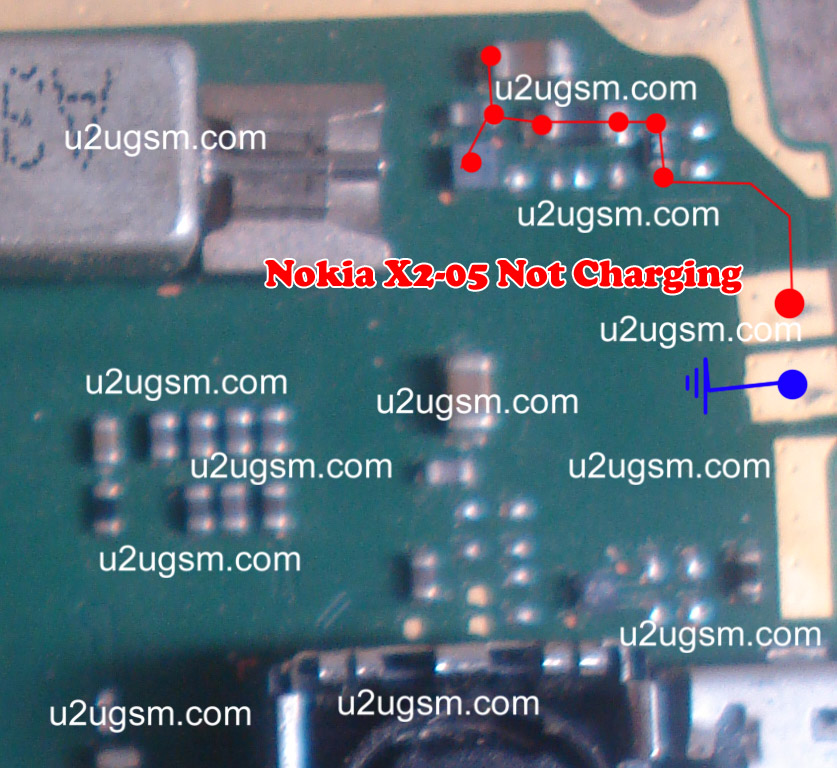
If notification on the Lcd of Nokia X2-05 will be about charger not supported it can be problem of charger not supported. And if notification displays about not charging. It can be the problem of water damages of may be due to in proper values of parts that are used in charging function of Nokia X2-05.
After disassambly of Nokia X2-05 look at the motherboard for rust carbon or burren parts. If you found some rust or carbon apply electronics cleaner on the mother board and apply hot air to make it dry proper.
Applying too much heat can damage the mother board and parts.It also can be harm for your skin.So keep in mind about normal heat flow when making it dry.
In above diagram a red line bar is used to identify parts and ways that are used in solution of not charging in Nokia X2-05. Once you track these parts with meter apply jumpers if any of them is missing, damage or giving un proper values. Whlie the blue line is used for negative point of the charging base.
Wednesday, October 15, 2014
Nokia X2 00 Not charging solution
Nokia X2-00 Not charging
nokia x2-00 charger not supported
nokia x2-00 charging not supported solution
nokia x2 charger not supported solution
nokia x2-05 charger not supported
x2-00 charger not supported
nokia x2-00 charging not supported
nokia x2 00 charger not supported
x2-00 charger not supported solution
x2-00 charging not supported
nokia x200 charger not supported
![Nokia]()
this resistance is used in all nokia mobile phones with same 47k value so you can use it from any of nokia mobile just position of resistance can be different in each mobile.
nokia x2-00 charger not supported
nokia x2-00 charging not supported solution
nokia x2 charger not supported solution
nokia x2-05 charger not supported
x2-00 charger not supported
nokia x2-00 charging not supported
nokia x2 00 charger not supported
x2-00 charger not supported solution
x2-00 charging not supported
nokia x200 charger not supported
this resistance is used in all nokia mobile phones with same 47k value so you can use it from any of nokia mobile just position of resistance can be different in each mobile.
Tuesday, October 14, 2014

Friday, September 26, 2014

Monday, September 15, 2014
Motorola DROID X2 Factory Soft Reset
Motorola DROID X2 (also called Motorola Daytona) Hard Reset to Factory Default Settings.
In this guide we show you how to hard reset the Motorola DROID X2 with step by step instructions.
Precautions: Performing hard reset process will delete or wipe all data from the. We highly recommend to have a back up copy of all your important files stored on the device.
Motorola DROID X2 Factory/Soft Reset:

On the main Home Screen,
->select MENU
->select SETTINGS-> PRIVACY
->select FACTORY DATA RESET
->select RESET PHONE
->Enter the password
->select ERASE EVERYTHING
If the Motorola DROID X2 is frozen: this may sometimes occurs when running multiple applications and the device become unresponsive, you may fix this by rebooting the device or removing the battery for a while. But if the problem still persist you may need to full factory reset the device.
Motorola DROID X2 Hard Reset through button combination for sever freezing problem., this will prompt you into recovery mode.
1. Turn the power off or remove the battery and reinsert it back again after a couple of seconds.
2. Press and hold the POWER+CAMERA buttons at the same time
3. Release the Camera button when prompted
4. Press and hold the Volume Down key
5. It will show A yellow exclamation display
6. Select the Wipe data/factory reset (Alt + W) option
Wait til the phone completely reboots. Thats it...
In this guide we show you how to hard reset the Motorola DROID X2 with step by step instructions.
Precautions: Performing hard reset process will delete or wipe all data from the. We highly recommend to have a back up copy of all your important files stored on the device.
Motorola DROID X2 Factory/Soft Reset:

On the main Home Screen,
->select MENU
->select SETTINGS-> PRIVACY
->select FACTORY DATA RESET
->select RESET PHONE
->Enter the password
->select ERASE EVERYTHING
If the Motorola DROID X2 is frozen: this may sometimes occurs when running multiple applications and the device become unresponsive, you may fix this by rebooting the device or removing the battery for a while. But if the problem still persist you may need to full factory reset the device.
Motorola DROID X2 Hard Reset through button combination for sever freezing problem., this will prompt you into recovery mode.
1. Turn the power off or remove the battery and reinsert it back again after a couple of seconds.
2. Press and hold the POWER+CAMERA buttons at the same time
3. Release the Camera button when prompted
4. Press and hold the Volume Down key
5. It will show A yellow exclamation display
6. Select the Wipe data/factory reset (Alt + W) option
Wait til the phone completely reboots. Thats it...
Sunday, August 24, 2014
Nokia X2 00 mmc not working
Nokia X2 with Memory Card Jumpers, Memory card Problems, Memory Card Ways, MMC Problem, MMC Solution
nokia x2-00 mmc not working
nokia x2-00 mmc solution
nokia x2-00 mmc ic jumper solution
nokia x2-00 light ic
nokia x2 02 mmc ic jumper
x2 memory ic jumper
nokia x2-00 memory card not working
x2 mmc ic jumper
nokia x2 memory card solutoin
x2-00 memory card problem
x2 mmc ic

if there is any water damages or rust clean these parts with electronics cleaner and leave it to dry for a few mints under electrical bulb
nokia x2-00 mmc not working
nokia x2-00 mmc solution
nokia x2-00 mmc ic jumper solution
nokia x2-00 light ic
nokia x2 02 mmc ic jumper
x2 memory ic jumper
nokia x2-00 memory card not working
x2 mmc ic jumper
nokia x2 memory card solutoin
x2-00 memory card problem
x2 mmc ic
if there is any water damages or rust clean these parts with electronics cleaner and leave it to dry for a few mints under electrical bulb
Wednesday, August 20, 2014
Wednesday, August 13, 2014

Subscribe to:
Posts (Atom)
