Saturday, October 18, 2014
Nokia 2330 Classic speaker ear piece problem solution jumper ways
If speaker is not working in Nokia 2330 Classic. We can not hear a voice call.Noice in ear peace speaker or low voice problem can be solve with this post.Read carefully all these tips and follow diagram that is given bellow to solve speaker problem solution in Nokia 2330 Classic.

In above diagram you can see red and blue lines.These lines are tracks and paths that are used in speaker function in Nokia 2330 Classic. So check all these parts with meter and if any of them is missing apply jumper.You can apply jumper at points that are shown in diagram for repairing speaker problem solution.
for more detail and new tips and tricks about cellphone service problem keep visiting this page we will update cellphone service diagrams timely with new cellphone diagrams.some related post are also given bellow you can read them also for more information about cellphone.
In above diagram you can see red and blue lines.These lines are tracks and paths that are used in speaker function in Nokia 2330 Classic. So check all these parts with meter and if any of them is missing apply jumper.You can apply jumper at points that are shown in diagram for repairing speaker problem solution.
for more detail and new tips and tricks about cellphone service problem keep visiting this page we will update cellphone service diagrams timely with new cellphone diagrams.some related post are also given bellow you can read them also for more information about cellphone.

Nokia C5 06 Voluem Keypad Lock keys not working Solution
If keypad lock key or volume keys are not working in Nokia C5-06 It can be cause or key damages or water damages in the mobile phone.If smartphone keys are not working you can do these steps that are given in this post and diagram bellow.nokia Asha 202 Mic problem solution jumper ways

After dis assemble of Nokia C5-06 look at mother board and If you found some rust carbon or water damages then it can also be cause of Nokia C5-06 keys problem to solve and fix keys problem in Nokia C5-06 clean all the rust and carbon with electronics cleaner and apply hot air to make it dry.
In above diagram you can see some different color lines. These lines are tracks and paths of keys button switch that are used for keypad lock and voluem of keys button switch.
Check all these tracks with meter and apply jumpers. If these key switches are not working then you can replace voluem and keypad lock buttons.
for more detail and new tips and tricks about cellphone service problem keep visiting this page we will update cellphone service diagrams timely with new cellphone diagrams.some related post are also given bellow you can read them also for more information about cellphone.
Read More..

After dis assemble of Nokia C5-06 look at mother board and If you found some rust carbon or water damages then it can also be cause of Nokia C5-06 keys problem to solve and fix keys problem in Nokia C5-06 clean all the rust and carbon with electronics cleaner and apply hot air to make it dry.
In above diagram you can see some different color lines. These lines are tracks and paths of keys button switch that are used for keypad lock and voluem of keys button switch.
Check all these tracks with meter and apply jumpers. If these key switches are not working then you can replace voluem and keypad lock buttons.
for more detail and new tips and tricks about cellphone service problem keep visiting this page we will update cellphone service diagrams timely with new cellphone diagrams.some related post are also given bellow you can read them also for more information about cellphone.
Friday, October 17, 2014
Nokia E55 E52 Mic ways Not Working

Nokia E55/E52 Mic Problem
Nokia E55/E52 Mic Line Trac
Nokia E55/E52 Mic Not Working
Nokia X2 02 Lcd Display Jumper Ways Problem Solution
Nokia X2-02 No display solution, Nokia X2-02 LCD problem solution, Nokia X2-02 Lcd jumper ways, Nokia X2-02 white and blank display lcd. All these problems can be due to water damages. Carbon and burn parts of the smartphone.nokia Asha 203 Usb Not Charging Problem Solution Jumper Ways

After disassambly of Nokia X2-02 look at the motherboard for rust carbon or burren parts. If you found some rust or carbon apply electronics cleaner on the mother board and apply hot air to make it dry proper.
Applying too much heat can damage the mother board and parts.It also can be harm for your skin.So keep in mind about normal heat flow when making it dry.
Remove old LCD and Check it with new one. In above diagram you can see some different color lines that are pointing to the parts which are used in Display function of Nokia X2-02.
Check all these parts with help of meter and apply jumpers as shown in above diagram to solve display problem in Nokia X2-02.
If you find some broken and missing components then apply jumper on points where small circles given in nokia lcd problem solution.
After disassambly of Nokia X2-02 look at the motherboard for rust carbon or burren parts. If you found some rust or carbon apply electronics cleaner on the mother board and apply hot air to make it dry proper.
Applying too much heat can damage the mother board and parts.It also can be harm for your skin.So keep in mind about normal heat flow when making it dry.
Remove old LCD and Check it with new one. In above diagram you can see some different color lines that are pointing to the parts which are used in Display function of Nokia X2-02.
Check all these parts with help of meter and apply jumpers as shown in above diagram to solve display problem in Nokia X2-02.
If you find some broken and missing components then apply jumper on points where small circles given in nokia lcd problem solution.
Nokia X2 02 Mic problem solution Microphone not working
If mic is not working in Nokia X2-02. Microphone solution with jumpers, Low voice of Nokia X2-02 mic problem solution, Nokia X2-02 mic jumpers to make it solve.Nokia X2-05 Not Charging Problem Solution Jumper Ways

If mic is not working or have a low voice it can be fault of mic and housing. Check Nokia X2-02 housing ( body ). All housing have a small whole at the point of mic. In some cases rust or dust cover this point and the voice can not reach proper to the mic point so make it clean if there is some dust on it.
After disassambly of Nokia X2-02 look at the motherboard for rust carbon or burren parts. If you found some rust or carbon apply electronics cleaner on the mother board and apply hot air to make it dry proper.
Applying too much heat can damage the mother board and parts.It also can be harm for your skin.So keep in mind about normal heat flow when making it dry.
Remove mic and check all these tracks that are provided in above diagram to solve mic problem in Nokia X2-02. In diagram two different color lines are given to identify all parts that are used to solve Nokia X2-02 mic problem with jumpers.
If some parts are missing or damage apply jumper on these points where small circles are pointing in nokia mic repairing diagram above.
If mic is not working or have a low voice it can be fault of mic and housing. Check Nokia X2-02 housing ( body ). All housing have a small whole at the point of mic. In some cases rust or dust cover this point and the voice can not reach proper to the mic point so make it clean if there is some dust on it.
After disassambly of Nokia X2-02 look at the motherboard for rust carbon or burren parts. If you found some rust or carbon apply electronics cleaner on the mother board and apply hot air to make it dry proper.
Applying too much heat can damage the mother board and parts.It also can be harm for your skin.So keep in mind about normal heat flow when making it dry.
Remove mic and check all these tracks that are provided in above diagram to solve mic problem in Nokia X2-02. In diagram two different color lines are given to identify all parts that are used to solve Nokia X2-02 mic problem with jumpers.
If some parts are missing or damage apply jumper on these points where small circles are pointing in nokia mic repairing diagram above.
Thursday, October 16, 2014
Nokia X2 05 Not Charging Problem Solution Jumper Ways
If we plug in charger into charging pin of Nokia X2-05 and show no notification on its Lcd. It will be cause of missing components or damages of charging pin, parts.Nokia Asha 203 MMC Memory card problem solution

If notification on the Lcd of Nokia X2-05 will be about charger not supported it can be problem of charger not supported. And if notification displays about not charging. It can be the problem of water damages of may be due to in proper values of parts that are used in charging function of Nokia X2-05.
After disassambly of Nokia X2-05 look at the motherboard for rust carbon or burren parts. If you found some rust or carbon apply electronics cleaner on the mother board and apply hot air to make it dry proper.
Applying too much heat can damage the mother board and parts.It also can be harm for your skin.So keep in mind about normal heat flow when making it dry.
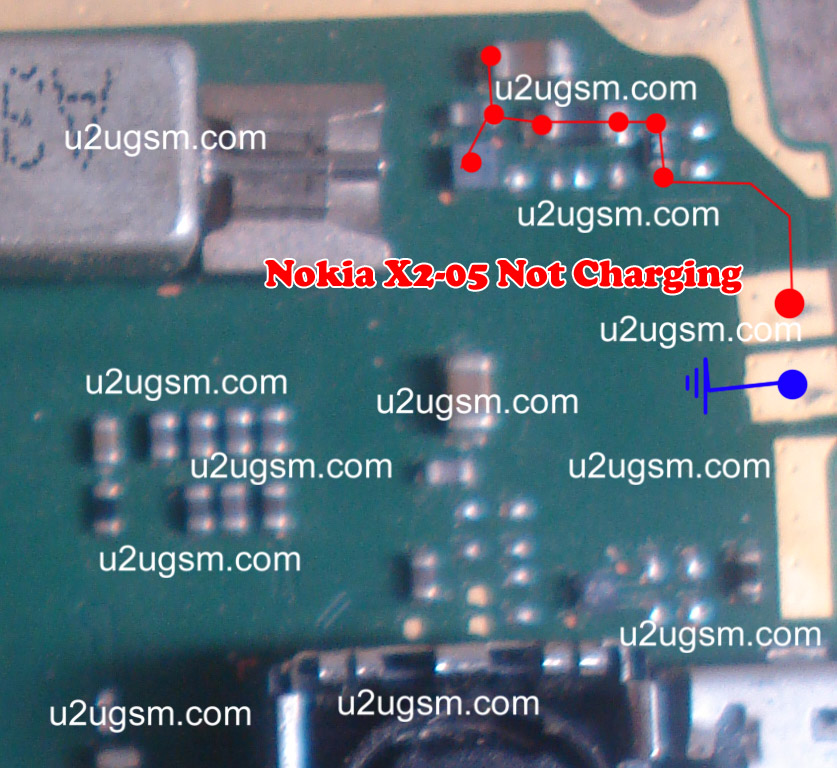
In above diagram a red line bar is used to identify parts and ways that are used in solution of not charging in Nokia X2-05. Once you track these parts with meter apply jumpers if any of them is missing, damage or giving un proper values. Whlie the blue line is used for negative point of the charging base.
If notification on the Lcd of Nokia X2-05 will be about charger not supported it can be problem of charger not supported. And if notification displays about not charging. It can be the problem of water damages of may be due to in proper values of parts that are used in charging function of Nokia X2-05.
After disassambly of Nokia X2-05 look at the motherboard for rust carbon or burren parts. If you found some rust or carbon apply electronics cleaner on the mother board and apply hot air to make it dry proper.
Applying too much heat can damage the mother board and parts.It also can be harm for your skin.So keep in mind about normal heat flow when making it dry.
In above diagram a red line bar is used to identify parts and ways that are used in solution of not charging in Nokia X2-05. Once you track these parts with meter apply jumpers if any of them is missing, damage or giving un proper values. Whlie the blue line is used for negative point of the charging base.
6100 Insert Sim Problem

6100 Sim Problem,
6100 Sim jacket Ways,
6100 Sim Ways,
6100 Insert Sim Solution,
6100 Sim Jacket Tracks
Subscribe to:
Posts (Atom)
